Check List
Accounting & Taxes
Introduction
The Check List is a listing of all NON-Payroll checks. It is used to manage, review, and research information about checks. This topic does not cover the paycheck list or payroll check processing.
Form Access
- From the main menu navigate to Banking > Lists > Checks, Vendors > Lists > Checks, or use the “Where to” search feature.
Check List File Paths
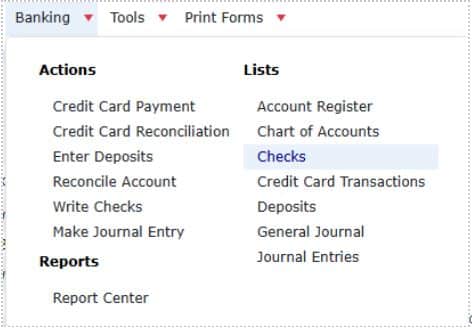
- From the “Where to” search bar, click on the search bar, and the type “Check List”.

Usage
The easiest way of using the commands available in this list is through the right click menu. 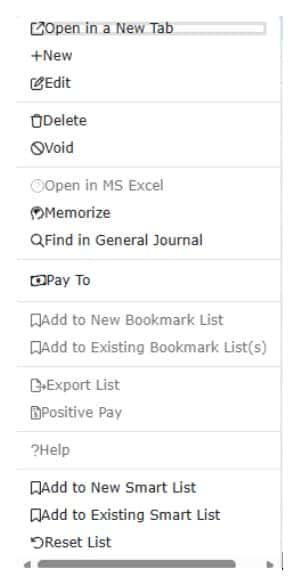
- To create a new check, right click anywhere in the list and choose New from the pop-up menu, or click the “+ Check” button.
- To edit a check, double click the check, or right-click on it and choose Edit Check from the pop-up menu.
- To delete a check, right-click on it and choose Delete Check from the pop-up menu.
- Note: It may not always be possible to perform this action, depending on subsequent bank reconciliations and other historical events which have involved this transaction.
- To void a check, right-click on it and choose Void Check from the pop-up menu.
- Note: It may not always be possible to perform this action, depending on subsequent bank reconciliations and other historical events which have involved this transaction.
- To memorize a check, right-click on it and choose Memorize Check from the pop-up menu.
- To export whatever information is currently displayed in the list, right-click anywhere in the list and choose Export List from the pop-up menu.
- To modify which columns are displayed in the list, click the three dots on any column header, then select the “Columns” drop-down and select your desired columns.
IMPORTANT NOTE
DO NOT CREATE CHECKS FROM THE CHECK LIST FOR ANY OF THE FOLLOWING: (See the individual Help Topic for each of the following).
- Paying Employees – Use the Process Pay Group form.
- Paying Sales Tax – Use the Pay Sales Tax form.
- Paying Payroll Taxes and Liabilities – Use the Pay Payroll Liabilities form.
- Paying Bills Already Entered Using the Enter Bills Form – Use the Pay Bills form.